Post Upgrade Fee as a Separate Line Item in Folios
Stay is enhanced to allow users to post upgrade fee as a separate line item in the guest folio when room upgrades are performed in the reservation. Users can choose from the following options:
-
Post upgrade fee as a separate charge from the room rate.
-
Post upgrade fee as a separate transaction item that is not associated with the rate plan of the reservation.
-
Post upgrade fee both as a separate charge from the room rate and as a different transaction item.
Post Upgrade Fee as a Separate Charge from the Room Rate
When users choose to post upgrade fee as a separate charge from the room rate and perform a room upgrade from the Recommended Upgrades section of the Reservation screen, the following updates are made to the Estimated Charges section:
-
A record is created for the room rate
-
A second record is created for the upgrade fee. The transaction item associated with the rate plan is displayed at the top followed by the Display Text configured for the upgrade fee.
Users can modify the upgrade fee for the future dates in the Estimated Charges section. When users edit the value less than the comp threshold, a comp category and reason should be entered as per the existing functionality. The entered reason will be displayed below the upgrade fee.
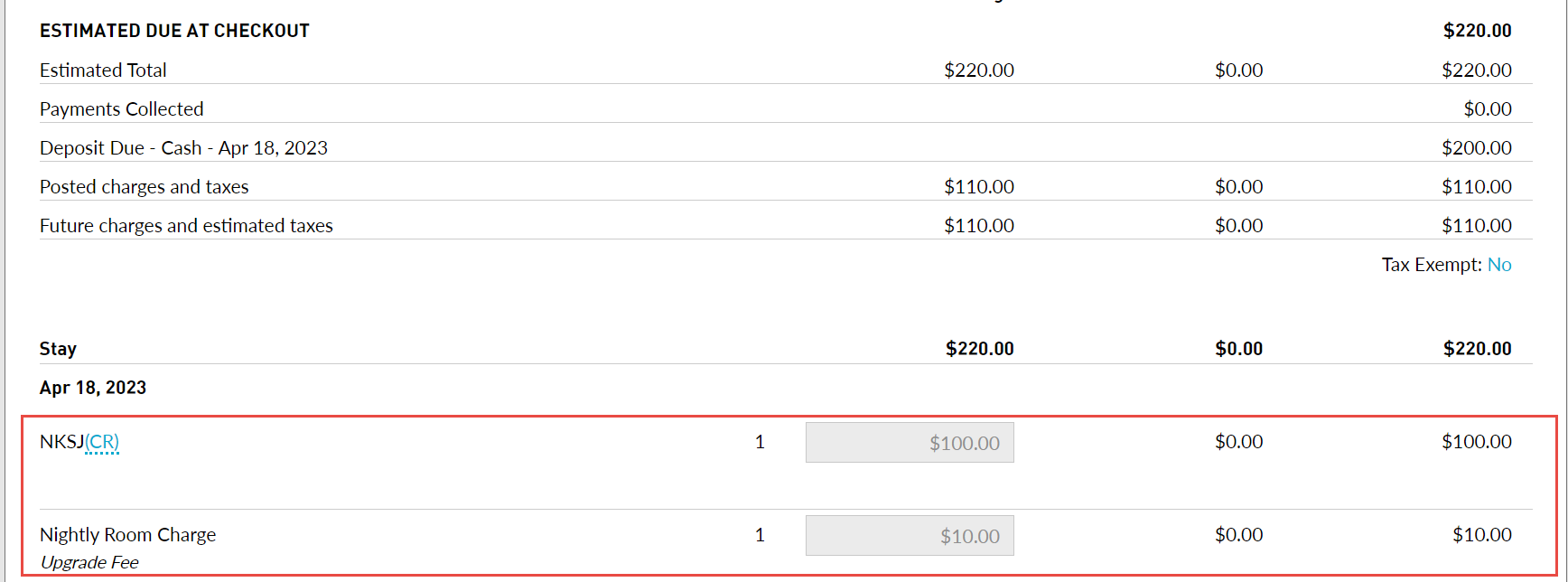
After Night Audit, the charges are posted to the guest folio as follows:
-
Nightly room rate as a line item
-
Upgrade fee as another line item in the format: transaction item associated with the rate plan followed by the Display Text configured for the upgrade fee.
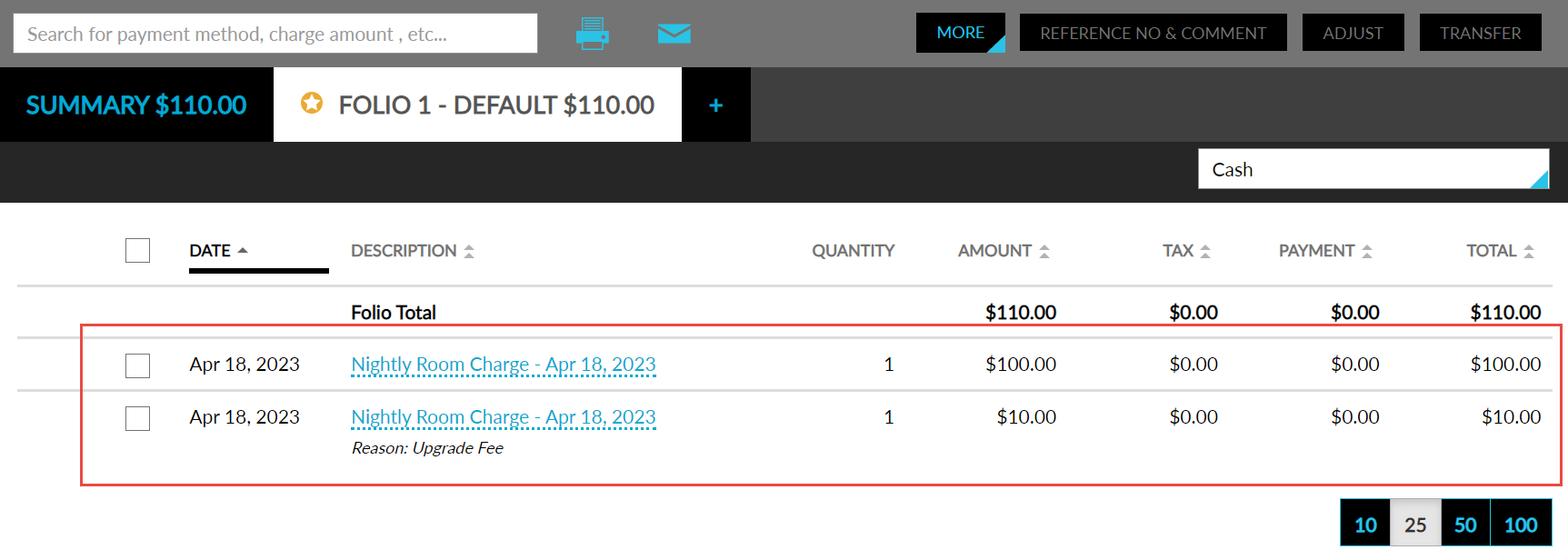
When the user prints or emails the guest folio, for the upgrade fee record, the Display Text configured for upgrade fee will be displayed instead of the transaction item, that is, the transaction item will be displayed in the folio but not when the folio is printed or emailed.
Post Upgrade Fee as a Separate Transaction Item
When users choose to post upgrade fee as a separate transaction item that is associated with the rate plan of the reservation and perform a room upgrade from the Recommended Upgrades section of the Reservation screen, the following updates are made to the Estimated Charges section:
-
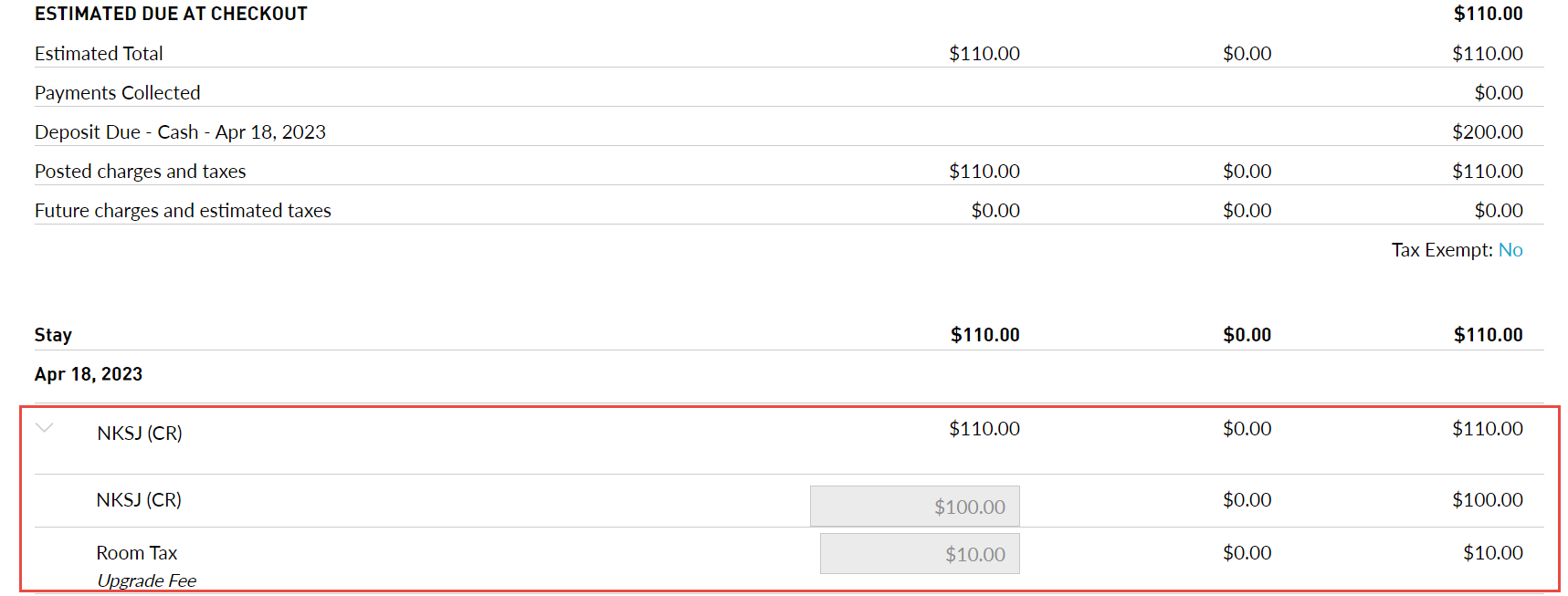
When users expand the accordion for each date of stay:
-
A record created for the room rate is displayed.
-
A second record created for upgrade fee is displayed in the following format: the transaction item associated with the upgrade fee followed by the Display Text configured for the upgrade fee.
-
Users can modify the upgrade fee for the non-posted dates in the Estimated Charges section. When users edit the value less than the comp threshold, a comp category and reason should be entered as per the existing functionality. The entered reason will be displayed below the upgrade fee.
After Night Audit, the charges are posted to the guest folio as follows:
-
Nightly room rate as a line item
-
Upgrade fee as another line item in the format: transaction item associated with the upgrade fee followed by the Display Text configured for the upgrade fee.
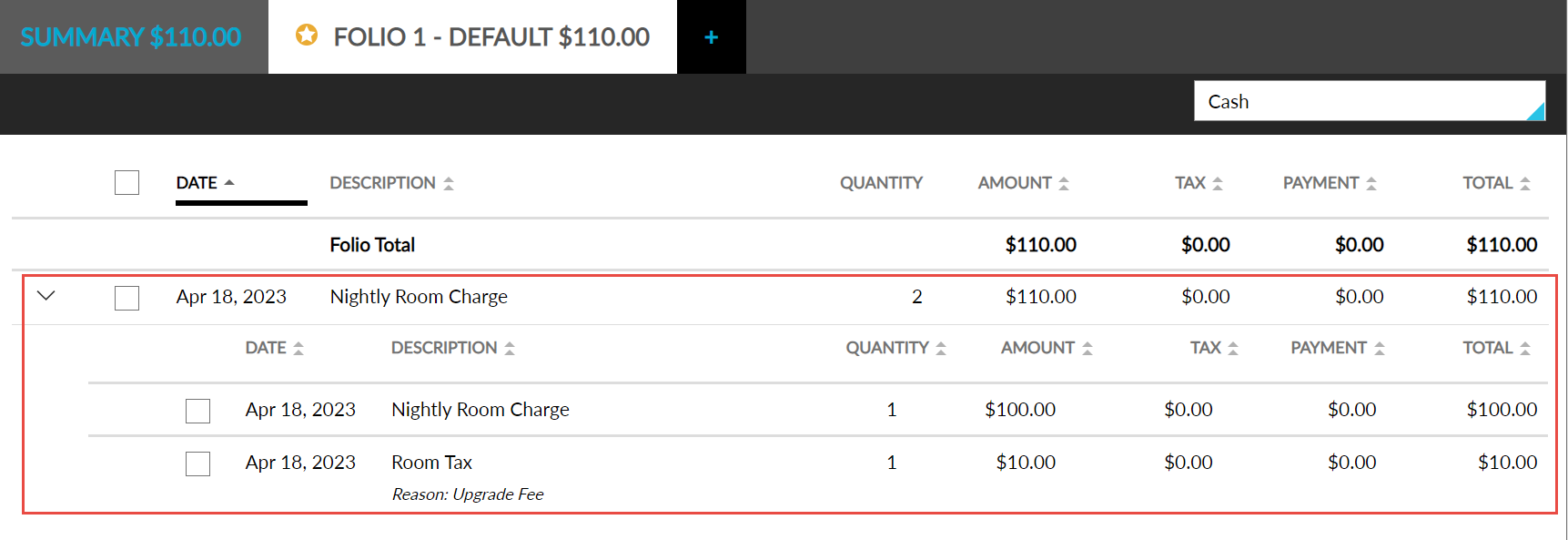
When the user prints or emails the folios, the individual line items inside the accordion are not displayed, only the summary row is displayed.
Post Upgrade Fee Both as a Separate Charge from the Room Rate and as a Different Transaction Item
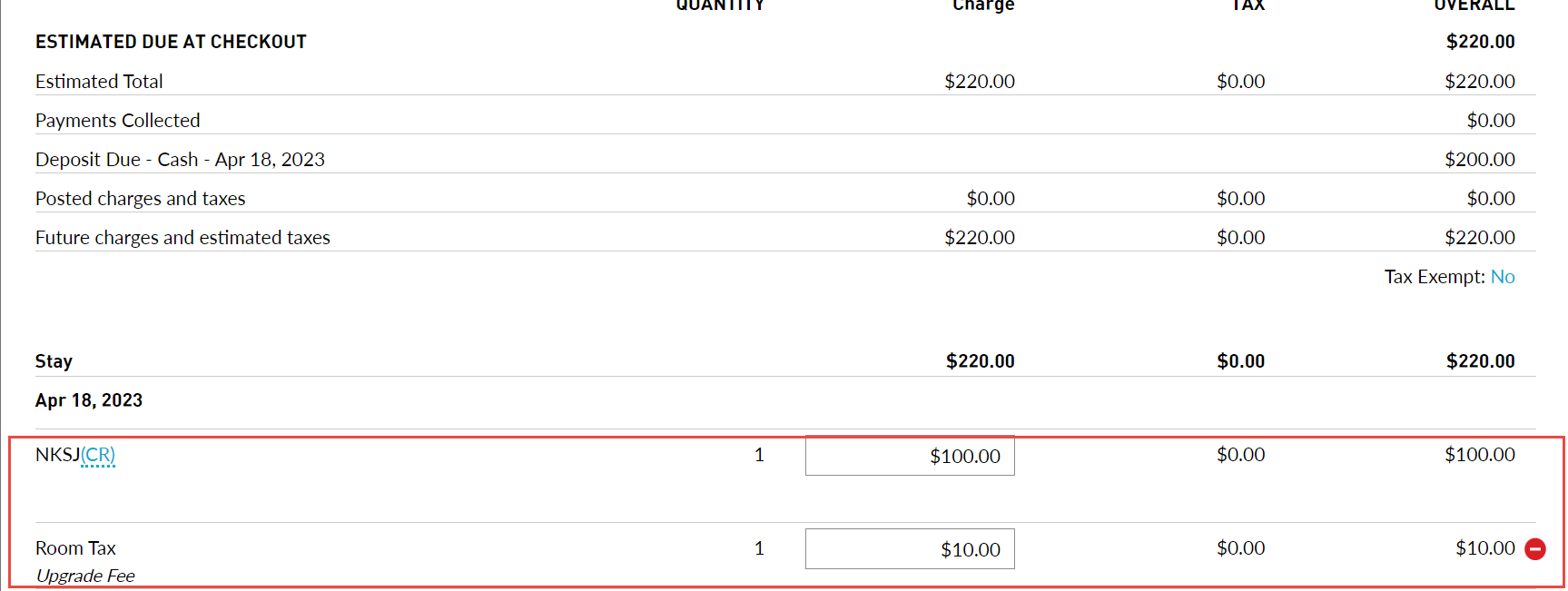
When users choose to post upgrade fee both as a separate charge from the room rate and as a different transaction item and perform a room upgrade from the Recommended Upgrades section of the Reservation screen, the following updates are made to the Estimated Charges section:
-
A record is created for the room rate
-
A second record is created for the upgrade fee. The upgrade fee is displayed in the following format: the transaction item associated with the upgrade fee followed by the Display Text configured for the upgrade fee.
After Night Audit, the charges are posted to the guest folio as follows:
-
Nightly room rate as a line item
-
Upgrade fee as another line item in the format: transaction item associated with the upgrade fee followed by the Display Text configured for the upgrade fee.
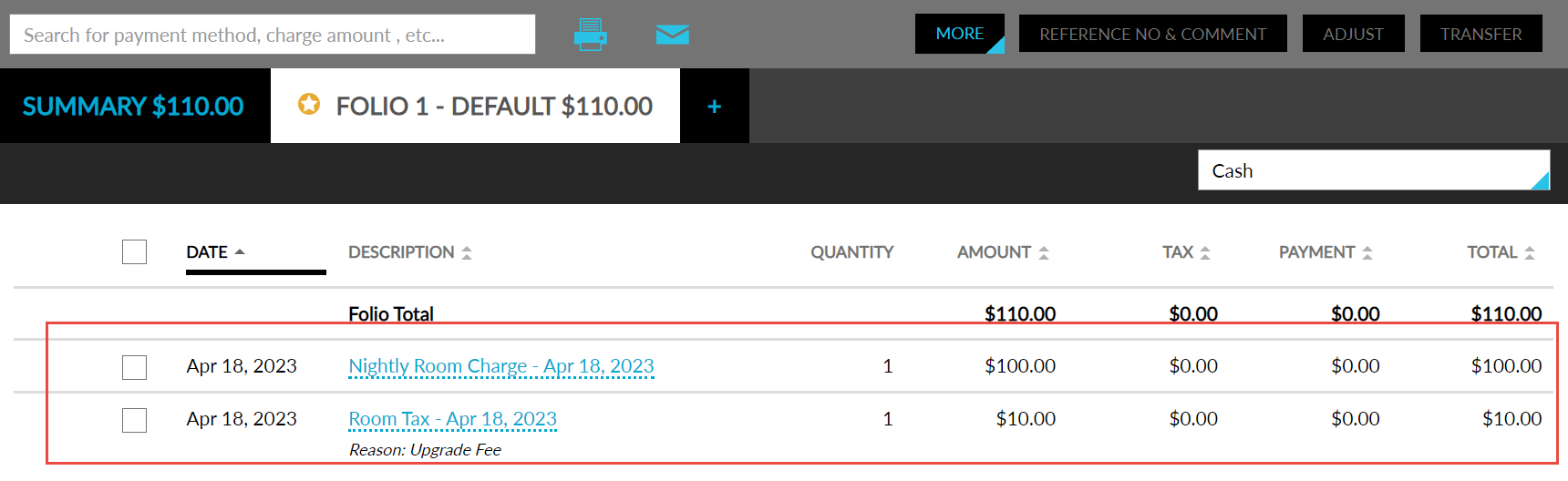
When the user prints or emails the folio, both the records for the nightly room rate and upgrade fee will be displayed.
The upgrade fee is displayed in the folio in this format when users perform upgrades via Agilysys Express Mobile and Stay Self Service.
When users perform complimentary or paid upgrades in addition to the room upgrades already performed, the rates are updated accordingly in the Estimated Charges section. The new upgrade fee will be added to the previously posted upgrade fee. When users perform room moves between the same room type or class, or when users choose a different rate plan without performing an upgrade, the previously posted upgrade fees will not be removed.
The revenue is tracked as per the existing functionality in the following reports:
-
Ledger Summary
-
Revenue by Transaction Items
-
Room Upgrade Tracking
-
Transaction Item Detail
-
Transaction Item Summary
-
Transactions Journal
To support this enhancement, the following changes have been made:
-
Two new flags, Post Upgrade Fee as a Separate Charge from the Room Rate, and Post Using Separate Transaction Item from a Rate Code, are added to the Upgrades section in the Rates screen.
-
Post Upgrade Fee as a Separate Charge from the Room Rate: When this flag is selected, the Display Text drop-down list is enabled. Users can configure the text to be displayed when an upgrade fee is posted to the folio. A maximum of 64 characters can be entered.
-
Post Using Separate Transaction Item from a Rate Code: When this flag is selected, the Transaction Item and the Display Text drop-down lists are enabled. Users can select the transaction item to be mapped with the upgrade fee and configure the text to be displayed in the folio.
-
When the two new flags are disabled, the Transaction Item and the Display Text drop-down lists are disabled, and the upgrade fee will be posted to the guest folio as per the existing functionality.
-